The extra features have attracted more people to use GB WhatsApp instead of the official one. To community admins, business groups, and social circles, one of the most useful tools within this modification is the ability to create and manage group invitation links. These links make the addition of members easy without the manual invites.
The following blog will walk you through everything you need to know: how to create the GB WhatsApp group link, how they work, why they can be helpful, how to edit them, general safety points, some common glitches you may get, and some general advice for more safely managing groups. It serves as an easy-to-understand resource for both a newcomer to using GB WhatsApp and an advanced user, ensuring that your running of groups is much easier.
What is a GB WhatsApp Group Link?
A GB WhatsApp group link is a unique invitation URL that allows someone to join a WhatsApp group by clicking on the link. Rather than adding members one by one, the admin of such a group shares the link with interested people. Once they click it, they can join, provided the group isn’t full, and the link is active.
GB WhatsApp extends this feature with more control over group links compared to the official app. Admins can manage who can access the link, when it expires, and how secure it is, making GB WhatsApp a preferred choice for large or private groups.
Why Group Links Matter in GB WhatsApp
Group links streamline the management of a group. They save time and effort, and also help the admins grow the group smoothly.
Key Reasons Group Links Matter:
- Easy and quick joining of members
- No manual adding of members
- Large groups are effectively managed.
- Advancing community and business development
- Give admins better control over access
GB WhatsApp supplements this with more customization options that amply increase these benefits.
How to Create a GB WhatsApp Group Invitation Link
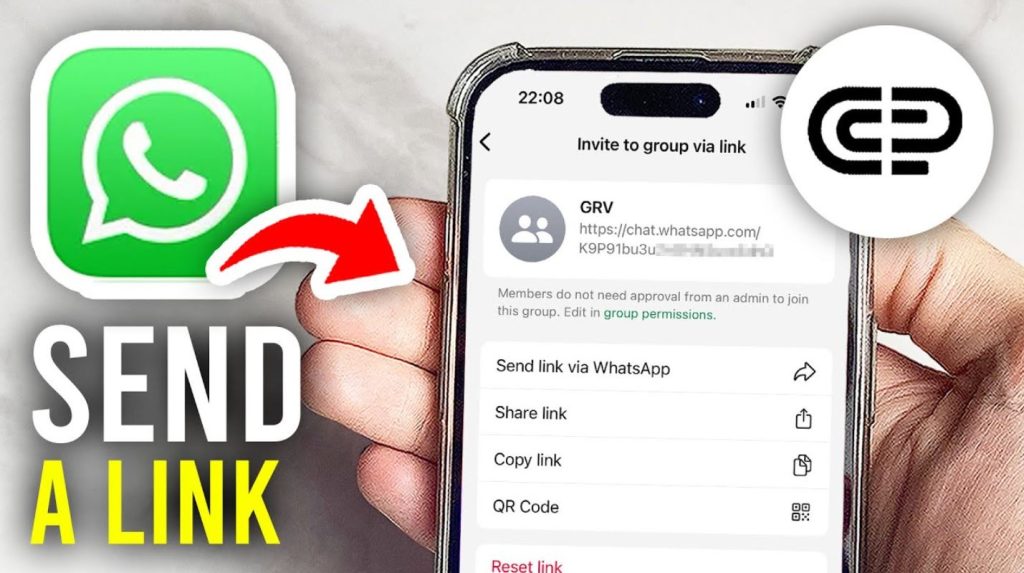
To create a group link in GB WhatsApp, technical knowledge is not required. Follow these steps:
1 Step: Open the GB WhatsApp
- Open the GB WhatsApp application on your Android device.
Step 2: Create or Open a Group
- You can either make a new group or open a group that you are an admin of.
Step 3: Access the Group Information
- Tap on the group name at the top of the chat screen. This will open the group information page.
Step 4: Choose the Invite via Link
- Scroll down and look for the Invite via link option. Tap on it.
Step 5: Generate the Group Link
- GB WhatsApp will automatically create a unique group invitation link.
Step 6: Share & Copy the Link
- You can copy the link or share it directly through social media, email, or messaging apps.
Anyone who clicks on this link can immediately join the group.
Enhanced Customization Options for GB WhatsApp Group Links
One of the major benefits of GB WhatsApp is the control it provides regarding group links. These features help admins in handling group security and privacy.
Set Group Link Expiration
Admins can also set a time limit for group links. After the expiration of the link’s time limit, the link will automatically become non-functional. This will ensure that unwanted members do not join the group later.
Regenerate Group Links
If an incorrect group of people is shared a group link, admins can recreate a new link. This will immediately disable the old link and prevent misuse.
Lock Group Links
GB WhatsApp gives admins the ability to lock group links. This ensures that members are not able to share the link without the admin’s consent.
Control Group Access
These features give admins control over when, how, and by whom the group link can be used. This is very helpful for private, professional, or temporary groups.
Benefits of Using GB WhatsApp for Group Links
GB WhatsApp is preferred by many users over the original WhatsApp because it provides more flexibility.
Better Customization
- GB WhatsApp gives admins more options to customize group links and access settings.
Enhanced Privacy
- Admins can shield groups from spam, unknown members, and unwanted membership.
Multi-Account Support
- GB WhatsApp allows users to have multiple accounts on the same device. This is very helpful for users who have to handle multiple groups.
Flexible Sharing Options
- There are fewer restrictions on how group links can be shared.
These benefits make GB WhatsApp a powerful tool for handling communities and groups.
Precautions When Sharing GB WhatsApp Group Links
GB WhatsApp group links allow easy addition of new members to the group, but careless sharing of the link can result in serious issues. If the group link is shared with the wrong people, it can cause spam, abuse, or loss of privacy. This is why all admins need to take proper precautions before sharing the group invitation link.
Avoid Sharing Group Links in Public
GB WhatsApp group links should never be shared on public platforms like open Facebook pages, public Telegram channels, forums, or comments.
The following problems can be caused by public sharing:
- Spam messages from unknown users
- Fake accounts are joining the group
- Unwanted content promotion
- Loss of group purpose and discipline
It is always advisable to share group links privately through direct messages or trusted platforms. This ensures that the group remains controlled and secure.
Establish Group Rules Early On
Having rules will help new members understand how the group operates. Admins should create simple group rules and pin them inside the group chat.
Important points to include in group rules:
- What type of content is allowed
- What type of content is not allowed
- Guidelines for posting frequency
When the rules are clear, the members are less likely to violate them.
Restrict Member Permissions
GB WhatsApp gives admins the ability to manage member permissions. This is a very useful feature for managing large groups.
Admins should think about limiting:
- Who can send messages
- Who can share media files
- Who can add new members
These measures help prevent spam and ensure that the conversation remains on track.
Monitor Group Activity Regularly
Admins need to keep a close eye on group chats. Inactivity on the group level for an extended period of time can result in abuse.
Regular monitoring helps in:
- Recognize spam mail quickly
- Remove disruptive members
- Maintain a positive environment
- Protect group reputation
Having an active moderation team is important for a healthy GB WhatsApp group.
Teach New Members After Joining
If new members are added to a GB WhatsApp group through a group link, they might not be aware of the purpose of the group.
Admins should:
- Send a welcome message
- Explain the group goal
Remind members of the rules
- Encourage respectful participation
GB WhatsApp Group Links: Common Errors and Smart Fixes
GB WhatsApp gives more levers to admins to run groups, which is great. But a few usual issues do pop up. Knowing them helps you fix things fast.
Expired Group Link
Sometimes, a link stops working because the expiration settings kick in.
What that means:
- New members can’t join
- You’ll have to generate a new link
- Old links are invalidated automatically
Tip: always check a link before you share it.
Group Size Limit Reached
GB WhatsApp reflects the maximum number of group sizes found in WhatsApp. Once the limit is reached, new members are not able to join via the link.
How to treat it:
- Remove members with no activity
- Create a new group
- Let potential joiners know the group is full
Invalid or Broken Group Link
Links can fail if they are regenerated or copied incorrectly.
Common causes of failure:
- Admin reset the link
- Format errors
- Bugs from app updates
Simple, just create a new GB WhatsApp group link.
Admin Permission Issues
Only admins can manage or reset group links in GB WhatsApp.
What regular members can’t do:
- Link generation
- Reset links
- Change the settings of access
If you need assistance, just elect trusted members to serve as co-admins.
Managing GB WhatsApp Groups: Best Practices
For running groups smoothly, try the following:
- Share links privately
- Use expiration to limit access
- Recreate links in is situations
- Create trusted admins
- Remove members that are inactive or disrupting the workflow
- Maintain updated rules in the group
These steps help in maintaining order and ensuring high engagement.
Security and Privacy Considerations
GB WhatsApp is a mod app, so be a little careful.
- Download only from trusted sources
- Keep the app updated
- Don’t share personal data of a sensitive nature.
- Change advanced settings of Privacy & Security
- Regular chats backup
Being responsible with the app reduces risk and boosts safety.
Conclusion
Using GB WhatsApp will definitely make creating and managing group links faster, easier, and adaptative. With link expiration, regeneration, and locking, admins truly have real control over who enters and how secure the group should be.
Monitor the activities and have disciplines maintained. When applied appropriately, the GB WhatsApp link contains smoothly growing communities and maintains the smooth flow of activities within them.
GB WhatsApp offers great tools for those who manage many groups or large ones, boosting group management beyond what is offered in the original WhatsApp.